Today marks the last day of the 2022-2023 Academic Year for judges to complete their required judicial education.

On March 30, 2020, the Court of Criminal Appeals issued an emergency order suspending all sections of the Rules of Judicial Education that require live, continuous hours of judicial education that would prevent a judge from completing his or her hours during the disaster. Governor Abbott did not renew the disaster declaration on June 15, 2023. Therefore, the emergency order suspending portions of the Rules of Judicial Education expired July 15, 2023. However, to promote certainty for judges planning their education hours, the Municipal Courts Education Committee passed a resolution providing that the status of the Rules of Education in effect on September 1st shall remain in effect through August 31, 2023.
Typically, each judge would need to satisfy at least eight of the required 16 hours (or all 16 for a judge completing a first or second year of education) through live, continuous training. Now, however, all 16 hours can be completed by electronic means through the end of this academic year. That’s today.
Canon 3B(2) of the Texas Code of Judicial Conduct was recently updated to specify that judges must meet all judicial education requirements set forth in governing statues or rules. Additionally, the Rules of Judicial Education require the Education Committee to submit the names of nonconforming judges to the Commission of Judicial Conduct by November 1.
TMCEC currently offers dozens of webinars on demand. Viewing webinars is a permissible method to satisfy your hours while the emergency order is in effect.
Finally, if illness or emergency is preventing you from completing the educational requirements this year, keep in mind that you may request a waiver (but the waiver will not be considered until late September 2023). If you have completed other relevant CLE or judicial education, you may submit an Intent to Opt Out form or request flex-time credit if you have completed at least two years of training and did not opt out of TMCEC training last year. For more information, see the Opt Outs & Waivers and Judicial Flex Time pages on the TMCEC website.
Checking the Number of Hours on Your Transcript
To check the current number of hours on your transcript, log into your registration account and click on the Transcript/Events tab, then click on the Transcript button. This is the same transcript that TMCEC staff would see. Count the hours earned between 9/1/2022 and 8/31/2023.

Refreshing and Updating Your Transcript
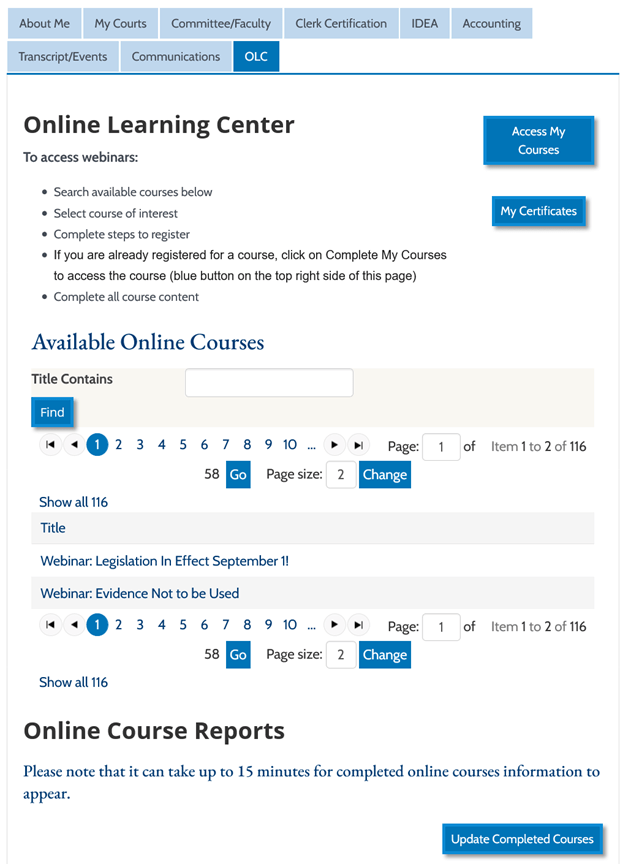
If you are certain you completed one or more webinar that is not reflected on your transcript and are certain you completed the evaluation and record of attendance, then clicking on the Update Completed Courses button while on the OLC tab will update your transcript. See the button in the bottom right corner of the screen grab below:
TMCEC is committed to assisting you with your educational requirements this year, and we are happy to answer your questions regarding your judicial hours via phone or email.
 Full Court Press